
The flagship feature of Ollie Pro is our growing collection of expertly-crafted WordPress patterns. WordPress patterns are pre-designed components that make it easy and fun to create beautiful pages and posts quickly. Patterns can be as small as a call-to-action box, or as big as a full page layout.
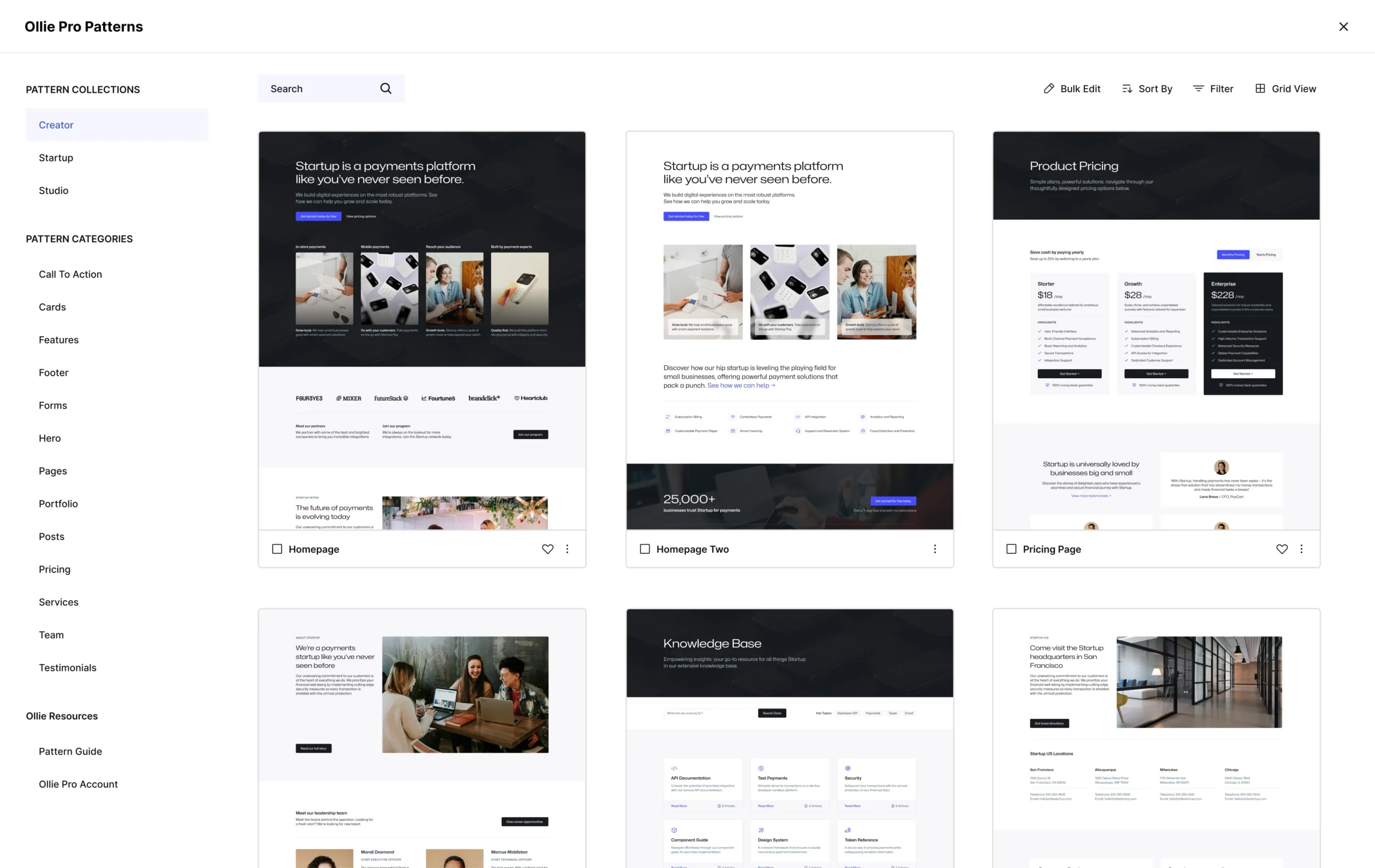
With Ollie Pro, you get instant access to the latest patterns and new collections with our continuously updated cloud library. We’ve built a powerful and intuitive pattern browser that you can use on any post or page to preview, download, copy, and favorite patterns.
Using the Ollie Pattern Library block
To start browsing patterns and designing your site with Ollie Pro patterns, add the Ollie Pattern Library block to your post or page. You can do that by using the block inserter and searching for “ollie” or by typing /ollie on any blank line and hitting enter.
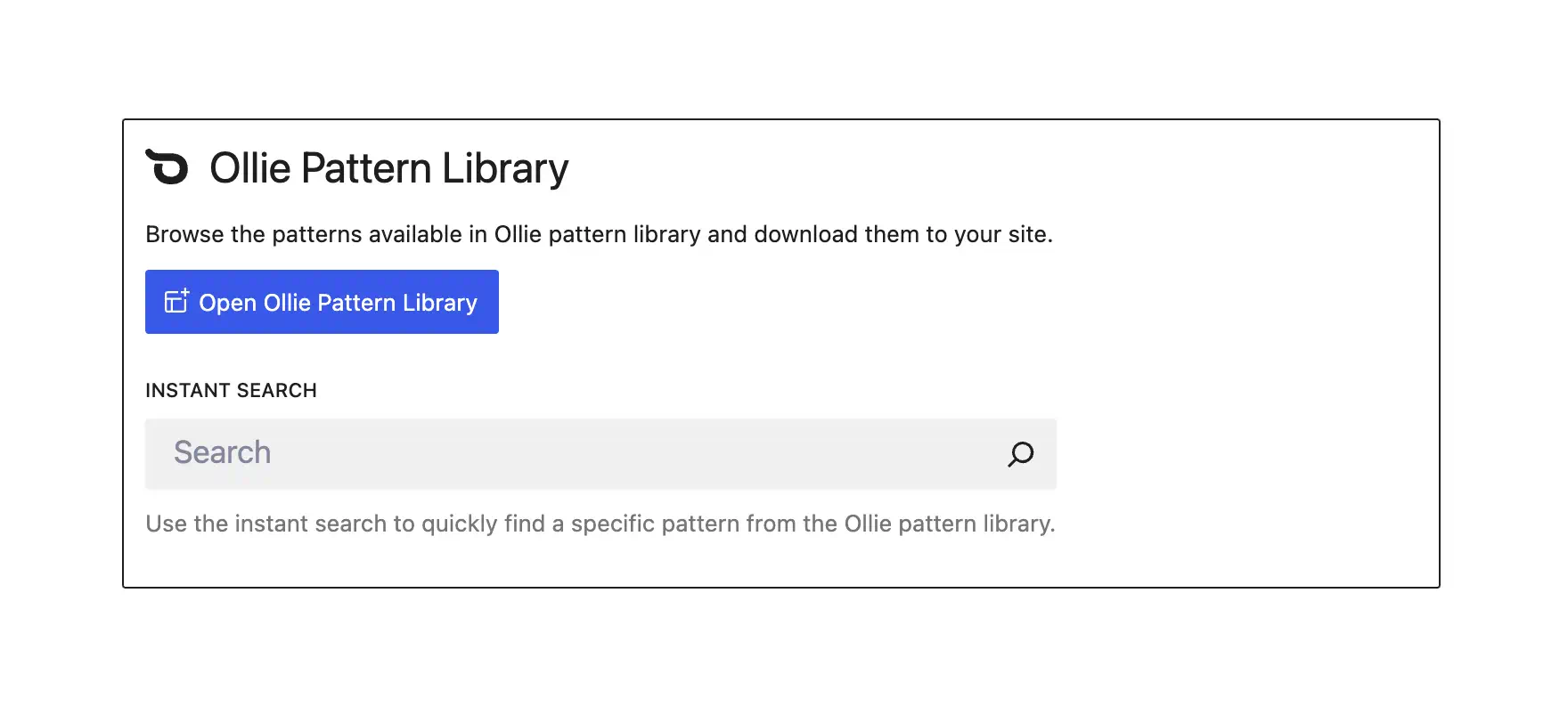
Once the block is added to the page, you’ll have a button to launch the library, or an instant search box where you can quickly search and insert patterns.
Working with the Ollie Pattern Library
The Ollie Pattern Library is designed to look very similarly to the default WordPress pattern browser to give you a familiar experience. But we’ve also added a lot of power features that will help you build faster.
Collections and Categories
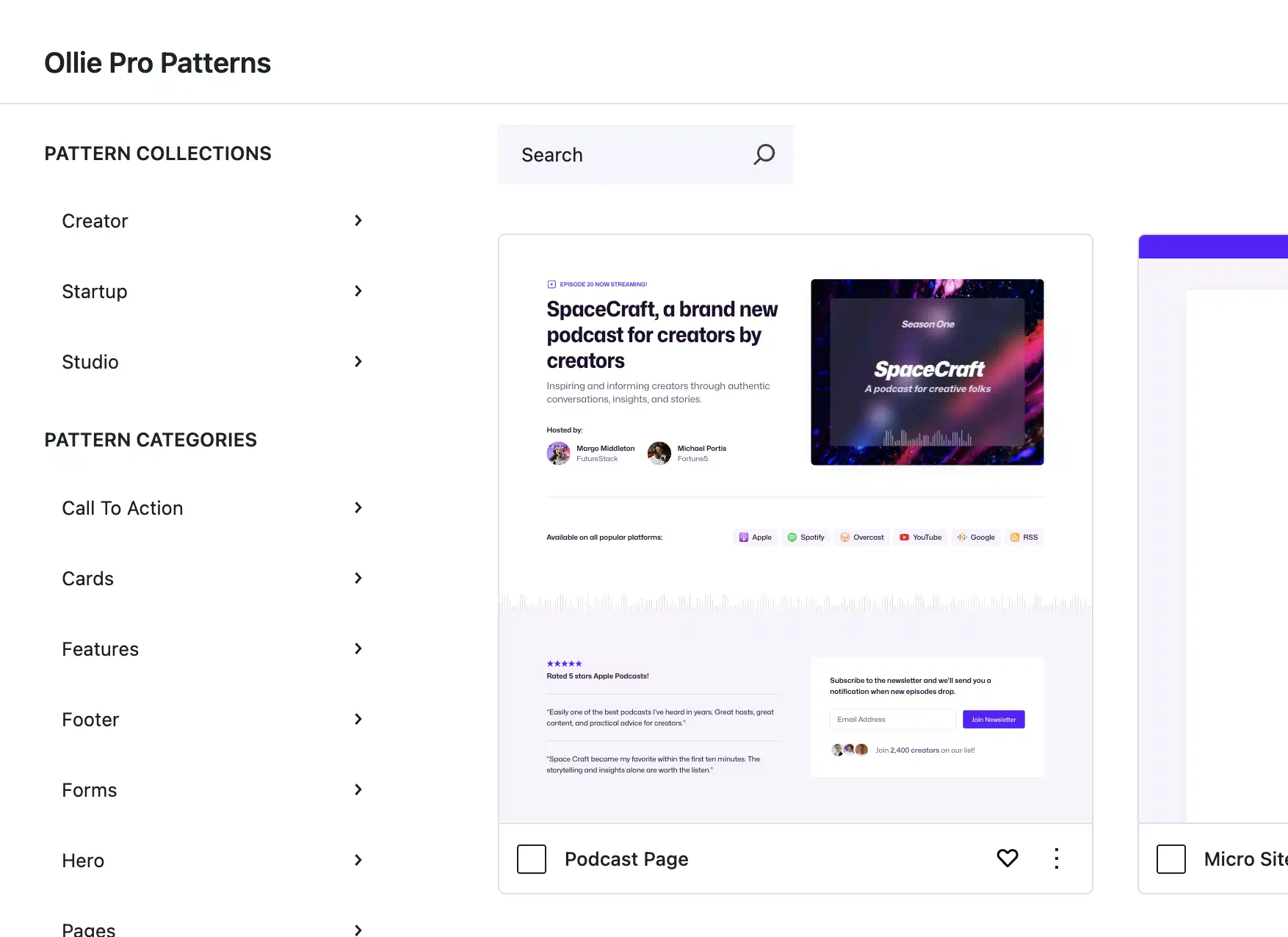
On the left side of the library, you’ll find links to browse patterns by categories or by collections. Collections are sets of patterns that are all designed with the same style — colors, typography, spacing, etc. Collections come with full page layouts as well as individual patterns that make up the layouts.
Browsing by category will show you categorized patterns from all the Ollie Pro collections. For example, clicking Hero will show you all of the hero designs from all the available collections.
Pattern Grid
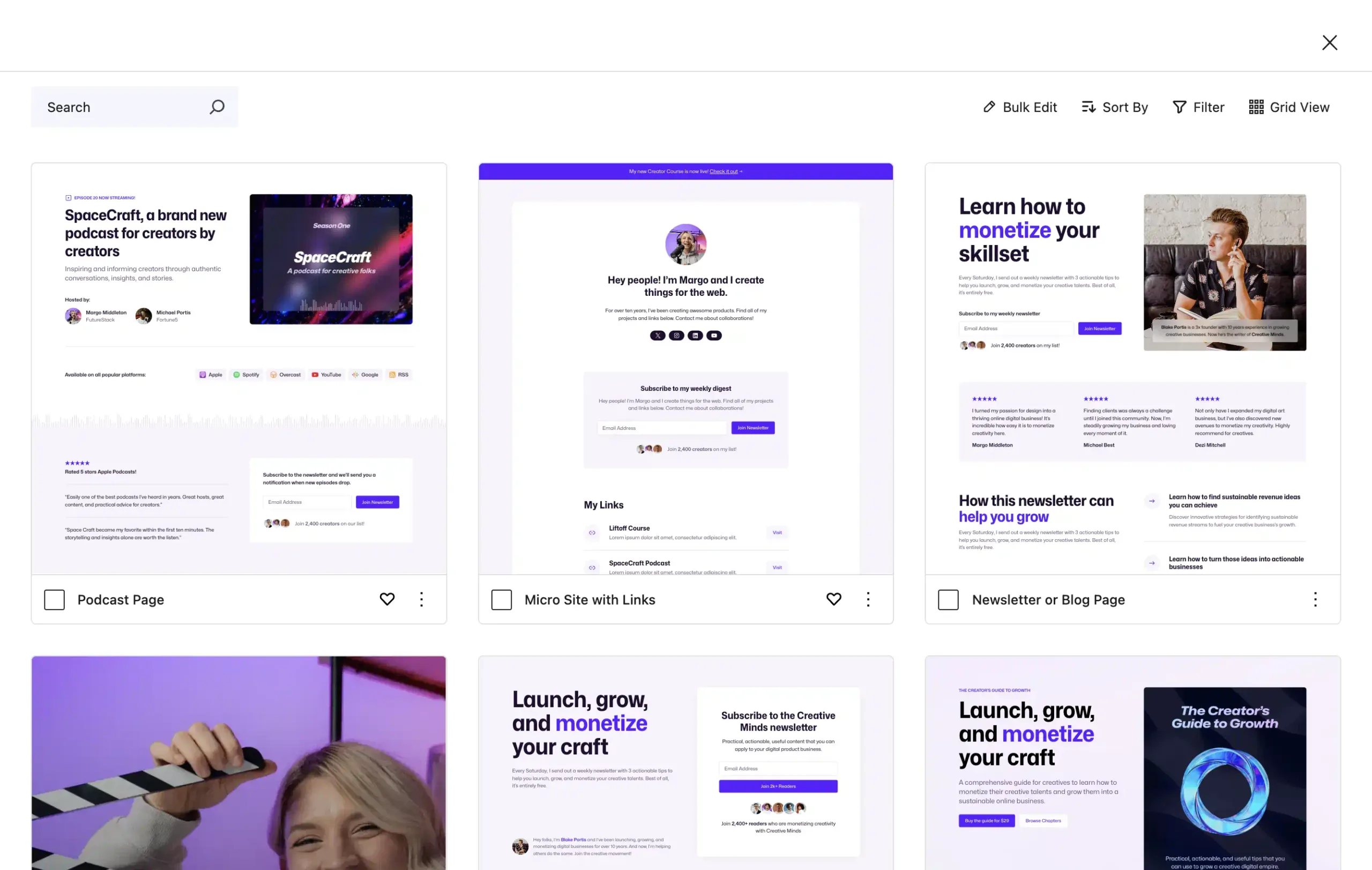
On the right side of the library, you’ll find the grid of patterns. You can click on any pattern to see a full preview of the pattern.
Along the top of the pattern grid, you’ll find a toolbar where you can modify the grid view. Using the Sort and Filter menus, you can modify the pattern view according to find what you’re looking for easier.
Using the Grid View menu, you can change the grid view to show two, three, or four columns. This is helpful when you want to see patterns nice and big, or when you want to see a lot at once for easier browsing.
Pattern Grid Actions
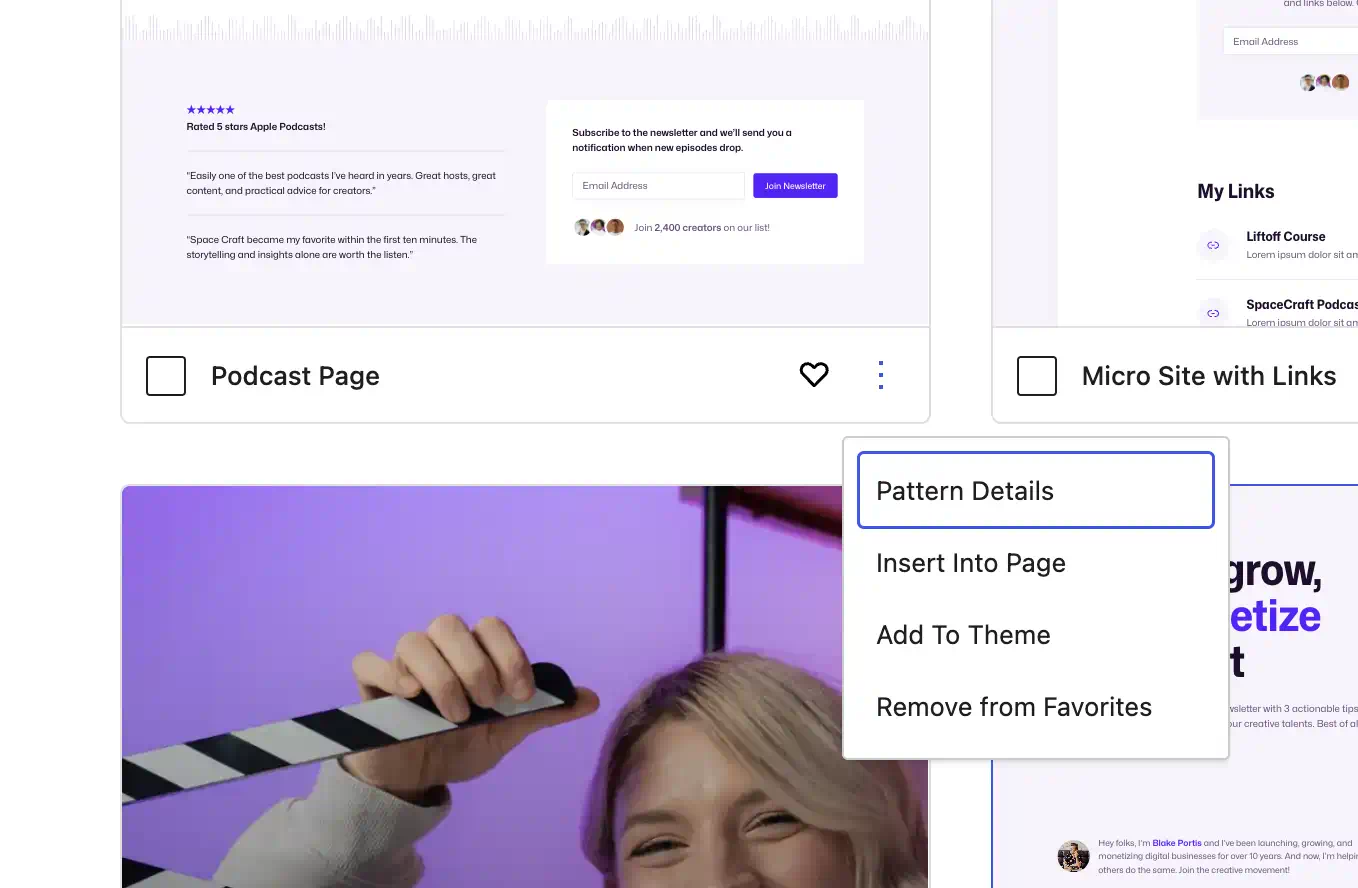
Each pattern on the grid also has an action menu where you can view pattern details, insert the pattern into the current page, download the pattern to your theme, and add a pattern to favorites.
Pattern Details
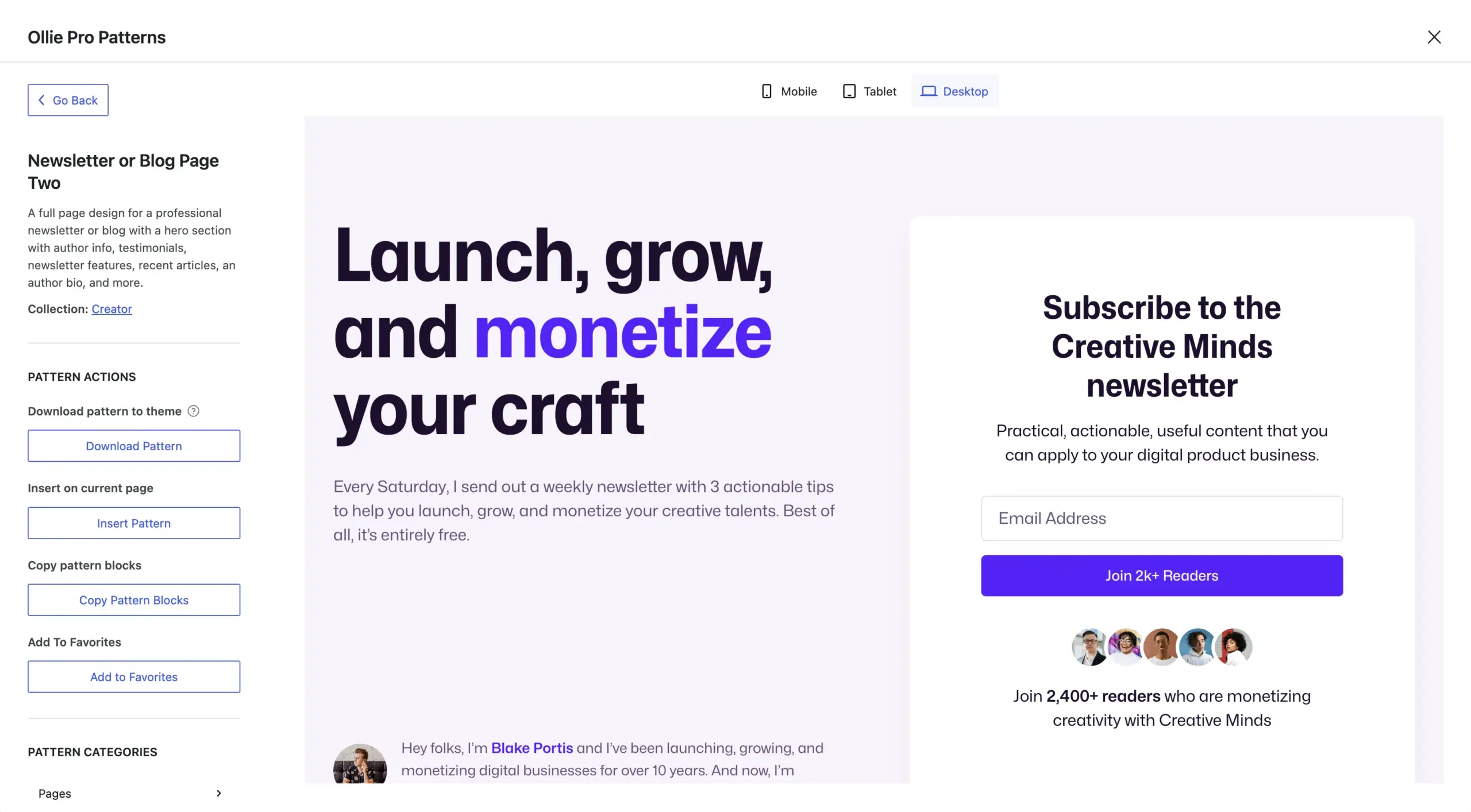
Clicking on any pattern will bring you to a pattern details view. Here, you can see a live preview of the pattern, along with a responsive view mode where you can see the pattern on different device sizes.
In the pattern details sidebar, you’ll find a description of the patter, several powerful pattern actions, and links to the categories the pattern is found in. Here is a quick breakdown of the powerful pattern actions we’ve included.
- Download Pattern – Download a copy of the pattern to your theme and add it to the /patterns folder. This also adds the pattern to your WordPress pattern library under My patterns, where you can modify, duplicate, and customize the pattern.
- Insert Into Page – Quickly add the pattern to the current page where you added the Ollie Pattern Library block
- Pattern Details – See a detailed view of the pattern and access more pattern options
- Copy Pattern Blocks – Copy the pattern markup to your clipboard so you can paste it in any WordPress post or page.
- Add/Remove from Favorites – Favorite a pattern so you can quickly access it later. Your favorites are available to any site you have Ollie Pro installed on.
-
Design faster and sell more with Ollie and WooCommerce
Read More: Design faster and sell more with Ollie and WooCommerceOllie now fully supports WooCommerce — with a complete suite of designs, templates, and tools to help you build a modern, blazing-fast store right inside the block editor.
-
3 power tips to level up your WordPress Full Site Editing skills
Read More: 3 power tips to level up your WordPress Full Site Editing skillsUnlock the next level of WordPress site design with Full Site Editing (FSE) advanced features like Block Patterns, Query Loops, and Reusable Blocks. These tools make designing complex, custom sites easier and faster—no coding required!
-
Ollie v1.3.0 just dropped with a new color variation
Read More: Ollie v1.3.0 just dropped with a new color variationToday I’m excited to share some updates about our latest release, Ollie 1.3.0. We’ve been hard at work refining and improving the theme to make it even better for WordPress creators like you.
-
Meet Agency, a brand new pattern collection for Ollie Pro
Read More: Meet Agency, a brand new pattern collection for Ollie ProIntroducing the Agency collection – bold, modern patterns designed to help startups and creative professionals build a powerful digital presence with WordPress.
-
Ollie Pro 1.3.0 gets a huge boost and new features
Read More: Ollie Pro 1.3.0 gets a huge boost and new featuresWe made Ollie Pro way faster added some handy tools to help you publish quicker, and updated the Ollie site.
-
The future of WordPress site building starts with Ollie Pro 2.0
Read More: The future of WordPress site building starts with Ollie Pro 2.0Ollie Pro 2.0 is a huge update that brings a revamped Ollie dashboard and three powerful new site building tools: the setup wizard, starter sites, and a child theme creator.
-
Introducing the Ollie Theme Academy video course
Read More: Introducing the Ollie Theme Academy video courseWe’ve just launched a comprehensive 150+ video course on modern WordPress theme development, and it’s free for everyone to watch.
-
Introducing the Ollie Block Dev Academy
Read More: Introducing the Ollie Block Dev AcademyWe’ve just launched a comprehensive video course on WordPress custom block development, and it’s free for everyone to watch.
-
WordPress as a modern design system: No code required
Read More: WordPress as a modern design system: No code requiredDiscover how global styles and patterns work together to create a modern and scalable design system right inside WordPress.
-
Fixing the sticky header bug in the WordPress site editor
Read More: Fixing the sticky header bug in the WordPress site editorThere’s a funny thing that happens when you try to use the sticky position feature on your header — it doesn’t work! Here’s how to fix it.
-
One year of Ollie Pro: leading the block theme revolution
Read More: One year of Ollie Pro: leading the block theme revolutionJust like that, it’s been a year of Ollie Pro being out there in the wild. Here’s a rundown of what we were able to do in the past twelve months. Spoiler alert: we were cookin’!
-
Menu Designer: The WordPress Menu Plugin Built for Block Themes
Read More: Menu Designer: The WordPress Menu Plugin Built for Block ThemesMenu Designer, our powerful WordPress menu plugin that lets you build beautiful navigation with blocks, is now officially available on WordPress.org.
-
Menu Designer is now available on WordPress.org
Read More: Menu Designer is now available on WordPress.orgMenu Designer is a powerful new WordPress plugin that lets you build beautiful, responsive dropdown menus and mobile menus using the native block editor.
-
Introducing Ollie Pro Extensions: Power Up Your WordPress Editor
Read More: Introducing Ollie Pro Extensions: Power Up Your WordPress EditorSupercharge your WordPress blocks with powerful enhancements that feel like they’ve always been part of the editor.
-
Introducing Class Manager: Professional CSS Control in the Block Editor
Read More: Introducing Class Manager: Professional CSS Control in the Block EditorCreate and manage custom CSS classes right in the block editor with an intuitive interface, pseudo-state support, and smart loading.
-
Design at lightspeed with Ollie Pro’s Smart Sync feature
Read More: Design at lightspeed with Ollie Pro’s Smart Sync featureSmart Sync is a new Ollie Pro extension that lets you style one block and instantly apply those changes to all similar blocks in your layout with a single click.
-
Gutenberg editor vs. Full Site Editing (FSE): what’s the difference?
Read More: Gutenberg editor vs. Full Site Editing (FSE): what’s the difference?What’s the difference between Gutenberg and Full Site Editing (FSE)? Discover how Gutenberg focuses on content editing while FSE expands block-based design to your entire WordPress site.
-
WordPress Block Themes: The Beginner’s Guide
Read More: WordPress Block Themes: The Beginner’s GuideLearn what WordPress block themes are, the benefits of using them, and some of the best to try in this beginner-friendly guide.
-
WordPress Block Patterns: What They Are and How to Use Them
Read More: WordPress Block Patterns: What They Are and How to Use ThemLearn what WordPress block patterns are, the benefits of using them, and some of the best to try in this beginner-friendly guide.
-
The Best WooCommerce Block Themes for 2026
Read More: The Best WooCommerce Block Themes for 2026Looking for the best block themes for your WooCommerce store? This guide walks you through the top choices.
-
Introducing the new and improved Ollie Pattern Library
Read More: Introducing the new and improved Ollie Pattern LibraryFind and assemble beautiful page layouts in seconds with the new Ollie Pattern Library powered by Ollie AI.
-
Why and How to Make the Switch to WooCommerce Blocks
Read More: Why and How to Make the Switch to WooCommerce BlocksLearn what WooCommerce blocks are and how to switch your store to using them with this guide.
-
WordPress 7.0: The Updates That Make Building Sites Easier
Read More: WordPress 7.0: The Updates That Make Building Sites EasierWordPress 7.0 has arrived. Learn what’s in the release and how it impacts full site editor themes like Ollie Pro.
-
How to Edit the Footer in WordPress the Easy Way
Read More: How to Edit the Footer in WordPress the Easy WayThis guide will walk you through how to edit the footer in WordPress.
-
How to Use WordPress Block Templates and Template Parts in 2026
Read More: How to Use WordPress Block Templates and Template Parts in 2026In this article, we’ll walk you through what WordPress block templates are and how they work in a theme like Ollie.
-
Design, write, and edit with AI — right inside WordPress
Read More: Design, write, and edit with AI — right inside WordPressA growing suite of AI-powered tools helps you design beautiful layouts with razor-sharp content.
-
WordPress Block Theme vs Page Builder
Read More: WordPress Block Theme vs Page BuilderTrying to decide between a WordPress theme vs page builder? This guide will walk you through the differences.
-
Another year of Ollie — and the foundation for what’s next
Read More: Another year of Ollie — and the foundation for what’s nextEverything we added to Ollie this year, from Pro Extensions to WooCommerce to AI in the editor — and where we’re going next.
-
How to Use AI in WordPress
Read More: How to Use AI in WordPressLearn how to use AI in WordPress with this guide. Including MCP, AI connectors, and block themes.
-
A Full Guide to the WordPress Site Editor
Read More: A Full Guide to the WordPress Site EditorLearn all about the powerful WordPress site editor and how to build blazing-fast websites with WordPress and Ollie.
-
Carousel Designer: The WordPress Carousel Block You’ve Been Waiting For
Read More: Carousel Designer: The WordPress Carousel Block You’ve Been Waiting ForBuild stunning, blazing-fast carousels and sliders with any blocks you like — right inside the WordPress block editor, included with Ollie Pro.
-
The Ollie website just got a new fresh coat of paint
Read More: The Ollie website just got a new fresh coat of paintThere’s a lot of exciting stuff going on with Ollie right now! The theme is going live on WP.org soon, Ollie Pro is coming together, and we just launched a shiny new site! Let’s take a look at some of the features of the new site
-
Surviving and thriving in the new WordPress economy
Read More: Surviving and thriving in the new WordPress economyThe next generation of the WordPress economy is upon us! Let’s take a look where we’re at and how to secure an equitable future for WordPress creators and users.
-
Five time-saving WordPress shortcuts you can’t live without
Read More: Five time-saving WordPress shortcuts you can’t live withoutWordPress is adding all kinds of handy UI improvements with every release, but they can be hard to spot. These shortcuts will save you tons of time.
-
Global styles and the future of CSS in WordPress
Read More: Global styles and the future of CSS in WordPressOne of the flagship features of WordPress’s full-site editing is Global Styles. Let’s dig into why this feature is going to be a complete game-changer.
-
While the web evolves, WordPress keeps the lights on
Read More: While the web evolves, WordPress keeps the lights onDespite getting the fly-over from the wider web community, WordPress has achieved historic growth, powering a massive slice of the day-to-day operations.
-
Spice up your WordPress content with Block Styles
Read More: Spice up your WordPress content with Block StylesBlock styles is one of those features that seems to have been lost in the rush to full-site editing. In this post, we’ll learn how to add style variations to your blocks.
-
Three beautiful font pairs to bring your design to life
Read More: Three beautiful font pairs to bring your design to lifeWith all the new fonts out there, there’s no excuse to be using tired old fonts on your website. Here are a few fonts that should definitely be on your radar.
-
Finding a new home for the WordPress community
Read More: Finding a new home for the WordPress communityThe recent turmoil at Twitter has a lot of WordPress community members looking for alternatives. What if we used WordPress to power our community?
-
Essential resources for learning WordPress block themes
Read More: Essential resources for learning WordPress block themesWordPress block themes are the new paradigm for site building in WordPress. Here are some essential resources to help you get started.
-
Patterns are gonna be a game changer for WordPress
Read More: Patterns are gonna be a game changer for WordPressPatterns are pre-designed bits of content that can be used to quickly design page sections or full page layouts. Learn more about the power of patterns in this tutorial.
-
Introducing the Ollie WordPress block theme
Read More: Introducing the Ollie WordPress block themeStart building beautiful and powerful WordPress websites with the new Site Editor and Ollie WordPress block theme. Let’s learn a little more about the theme.
-
Learn how to design in the WordPress editor
Read More: Learn how to design in the WordPress editorIn this first installment of my Build With Ollie tutorial series, we’ll create beautiful, responsive page section with native WordPress blocks and settings.
-
A native and iterative approach to responsive control in WordPress
Read More: A native and iterative approach to responsive control in WordPressHow our design looks on mobile devices is hugely important. For that reason, we need to talk about responsive design controls in WordPress and whether or not we need them.
-
Don’t call it Gutenberg anymore (unless you actually mean to)
Read More: Don’t call it Gutenberg anymore (unless you actually mean to)There’s been a lot of confusion about the term “Gutenberg” and what it actually means. In this post and video, we’ll dive into the topic and clear it up!
-
In pursuit of a more intuitive onboarding experience
Read More: In pursuit of a more intuitive onboarding experienceWith Ollie patterns, we’re able to help you apply a pre-designed homepage super quickly, but there are still a bunch of steps you have to do before you get to that point. Let’s explore some solutions.
-
Introducing Ollie, a hub for the next generation of WordPress
Read More: Introducing Ollie, a hub for the next generation of WordPressOllie is a new resource where WordPress creators can find tutorials and tools for the block editor and full-site editing.
-
The Ollie block theme is now available on WordPress.org!
Read More: The Ollie block theme is now available on WordPress.org!Over the past several weeks, we’ve been working through the review to get this theme approved at WordPress.org. And as of this morning, Ollie is now available on the official directory! 🥳
-
Unlock the Future of WordPress Design with Ollie Pro
Read More: Unlock the Future of WordPress Design with Ollie ProOllie and Ollie Pro supercharge your WordPress site-building experience with a powerful block theme and a growing collection of expertly-crafted WordPress patterns and pattern browser.
-
The Ollie Pro pattern browser just got a huge boost
Read More: The Ollie Pro pattern browser just got a huge boostWe’ve just shipped some crazy performance enhancements to the Ollie Pro plugin. Read about how we made a few big changes to make the pattern browser blazing fast.
-
Our first $10k and lessons learned in the first 30 days
Read More: Our first $10k and lessons learned in the first 30 daysOllie Pro has been live for 30 days and we’ve earned our first $10k! We’ve also learned a lot about our path forward in modern WordPress.
-
Ollie wins 1st place in the Bluehost Creator Awards
Read More: Ollie wins 1st place in the Bluehost Creator AwardsThe momentum around Ollie just continues to grow! Following our exciting and successful launch, we’ve got another bit of news to share.
-
Start building smarter and faster with synced patterns
Read More: Start building smarter and faster with synced patternsDiscover the power of synced patterns in WordPress. Learn how these game-changing features can streamline your design process, ensure consistency across your site, and save you time.
-
Supercharge your WordPress layouts with dynamic patterns
Read More: Supercharge your WordPress layouts with dynamic patternsNow, with just a click, you can transform any compatible pattern into a dynamic layout that pulls content directly from your WordPress posts and pages.
-
We are WordPress
Read More: We are WordPressA brief essay on WordPress, open source, and the people who continue to make it free, open, and accessible to all. Inspired by my recent trip to WordCamp US in Portland.
-
A recap of my time at WordCamp US 2024 in Portland
Read More: A recap of my time at WordCamp US 2024 in PortlandMini skateboards, shiny stickers, a million conversations, and a boat load of inspiration. This is a quick writeup of my time at WordCamp US 2024.
-
How To Create A Custom WordPress Blog Template In FSE
Read More: How To Create A Custom WordPress Blog Template In FSEWith FSE in WordPress, designing a stunning, fast-loading, SEO-optimized WordPress Blog Template is much easier than you think – here’s why…
-
Is it worth switching to WordPress FSE? Yes, and here’s why
Read More: Is it worth switching to WordPress FSE? Yes, and here’s whyThinking of making the switch to WordPress full-site editing but not sure if it’s for you? Here’s some seriously compelling benefits FSE brings to the table.
-
WordPress 6.7 Release Date & New Features Detailed
Read More: WordPress 6.7 Release Date & New Features DetailedThe release of WordPress 6.7 is just around the corner. Here’s everything you need to know about its new features, updates, and what it can do for your site in 2025…
-
WordPress Content Model: The Future of Custom Post Types?
Read More: WordPress Content Model: The Future of Custom Post Types?Automattic is working on bringing custom fields to the WordPress core. It’s called Content Model – here’s what you need to know…
-
Ollie WP vs. Ollie Pro: Which One is Right for You?
Read More: Ollie WP vs. Ollie Pro: Which One is Right for You?Here’s a complete breakdown of the main differences between Ollie WP and Ollie Pro, who Pro is great for, and what you can do with both.